CLI Reference
Complete command map, execution modes, output contracts, and automation conventions for worldfoundry-eval.
On this page
worldfoundry-eval is the canonical command-line entrypoint for WorldFoundry. It covers catalog discovery, readiness checks, typed model inference, benchmark execution, result normalization, reporting, and validation. Use the Quickstart for the first clone-to-run walkthrough; use this page when choosing a command or checking its contract.
Safe to inspect
Help, catalog discovery, --model-status, --print-config, --plan-only, and local asset checks do not load model weights. They are the right place to start on a CPU-only machine or before allocating a GPU job.
Install and verify
Run commands from the repository root after activating the unified environment.
bash scripts/setup/bootstrap_worldfoundry.sh
source tmp/worldfoundry_unified_env.sh
conda activate "${WORLDFOUNDRY_UNIFIED_ENV_PREFIX}"
worldfoundry-eval --help
For catalog and core CLI development in an existing Python environment:
python -m pip install -e .

# Add an optional surface only when needed.
python -m pip install -e ".[tui]"
python -m pip install -e ".[mcp]"
Model and benchmark runtimes can still require the environments and assets declared by their profiles.
If the console script is not on PATH, the module entrypoint uses the same parser:
python -m worldfoundry --help
python -m worldfoundry zoo models --json
Running worldfoundry-eval with no arguments prints a short first-run banner. Add --help for the complete top-level command list.
Entrypoints
| Entrypoint | Use |
|---|---|
worldfoundry-eval | Canonical CLI used throughout the documentation. |
worldfoundry | Alias of worldfoundry-eval; it dispatches to the same main() function. |
python -m worldfoundry | Module fallback when an editable install or console-script PATH is unavailable. |
worldfoundry-tui | Dedicated alias for the terminal UI; equivalent to worldfoundry-eval tui. |
worldfoundry-mcp | Dedicated MCP server entrypoint; worldfoundry-eval mcp reaches the same surface. |
worldfoundry-studio | Separate Studio launcher. See the Studio guide. |
Examples below use worldfoundry-eval so shell history, job scripts, and bug reports share one spelling.
Help at every level
Append --help after the command whose flags you need. Options belong to the leaf command, so --json is written after zoo models, not before it.
worldfoundry-eval --help
worldfoundry-eval zoo --help
worldfoundry-eval zoo model-show --help
worldfoundry-eval run --help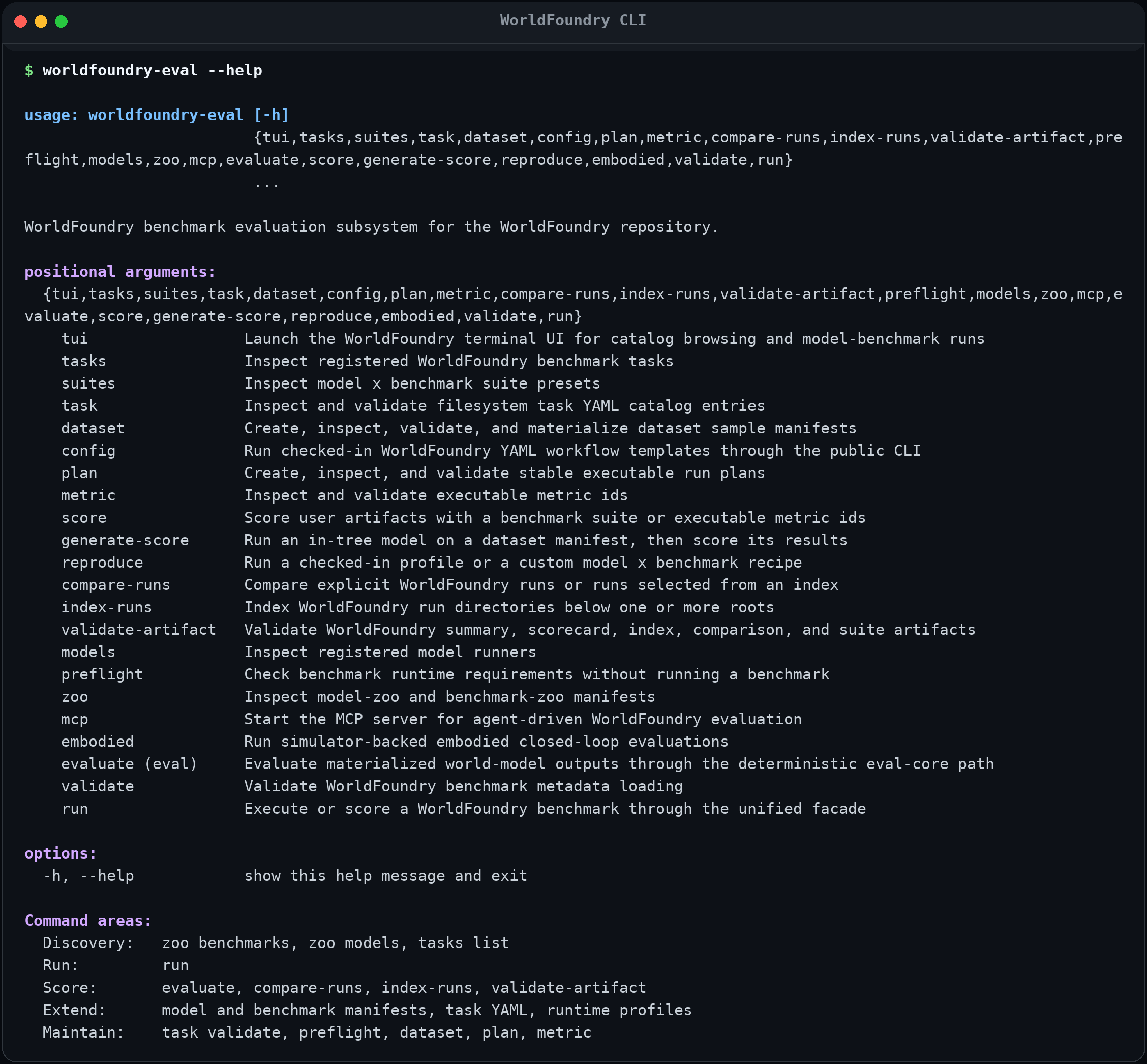
Captured from the current CLI. The screenshot can be regenerated with npm run cli:screenshots in docs/fumadocs.
Model-specific help
The positional form run MODEL loads that model's inference schema and adds typed --pipeline.*, --pipeline.load.*, and --runtime.* options to its help page.
worldfoundry-eval run self-forcing --help
worldfoundry-eval run self-forcing --model-status
worldfoundry-eval run self-forcing --print-config --json--pipeline.*controls request inputs and generation defaults.--pipeline.load.*controls checkpoint and model-loading fields.--runtime.*controls the execution device and runner settings.--model-statusand--print-configresolve metadata only; they do not load weights.
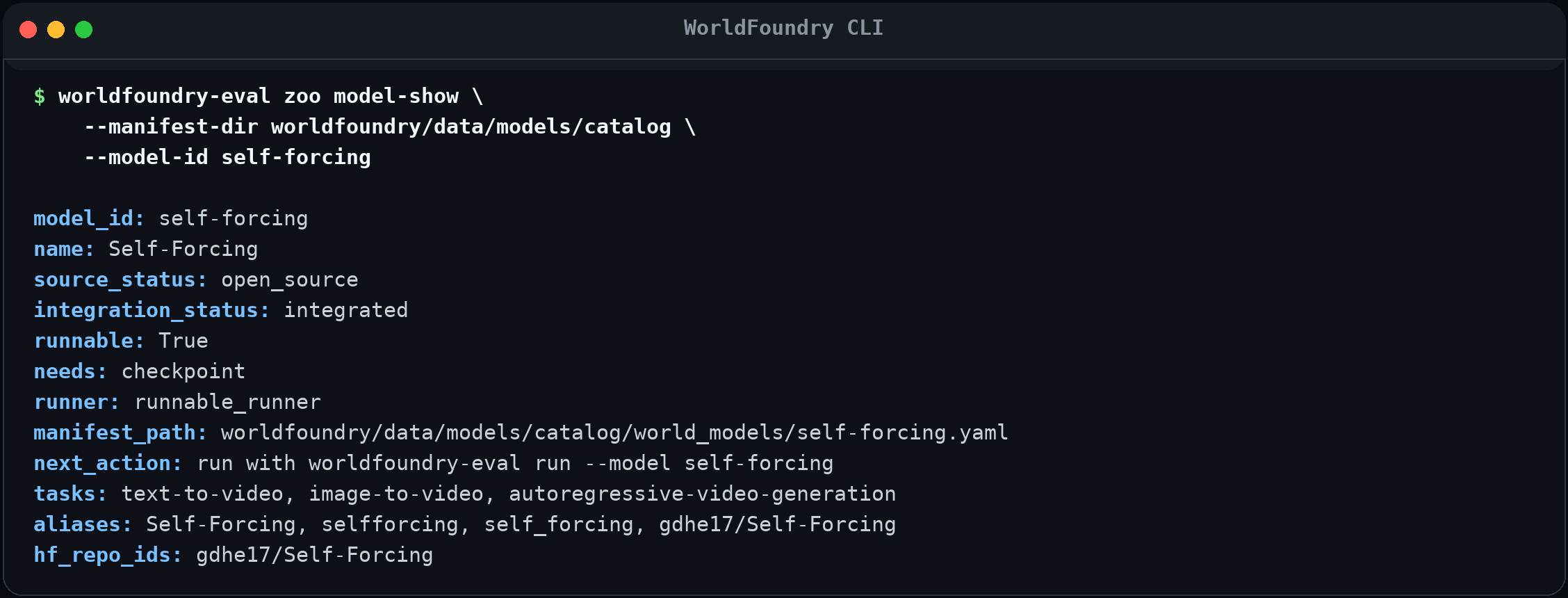
Choose the right command
Several commands can reach the evaluation core, but they start from different user inputs.
| Goal | Prefer | Why |
|---|---|---|
| Browse stable model or benchmark IDs | zoo models, zoo benchmarks, zoo model-show, zoo benchmark-show | Reads the release catalogs and surfaces readiness, aliases, needs, and next actions. |
| Run one model directly | run MODEL | Adds model-specific typed inference flags. |
| Run one or many model × benchmark cells | run --model ... --benchmark ... | Unified facade for a cell, repeated IDs, named suites, resume, cache, and plan-only execution. |
| Score an artifact directory with a benchmark | score --benchmark ... --artifacts ... | User-oriented scoring intent with a complete benchmark protocol. |
| Score WorldFoundry result rows with explicit metrics | score --results ... --metric ... | Compact existing-results workflow. |
| Execute a materialized run plan or use eval-core fields directly | evaluate (alias eval) | Lower-level deterministic path for requests/results ledgers and model-mode evaluation. |
| Generate from a dataset manifest, then score | generate-score | One intent owns dataset materialization, generation, cache, and metrics. |
| Import or execute one benchmark's official surface | zoo benchmark-run | Exposes benchmark-specific modes and parameters. Follow that benchmark's Hub page. |
| Re-run a checked-in profile or recipe | reproduce | Resolves a named profile, benchmark default, or recipe YAML. |
| Build indexes, comparisons, or contract checks | index-runs, compare-runs, validate-artifact | Operates on durable run outputs without rerunning a model. |
Complete command map
Discovery and interactive surfaces
| Command | Subcommands / role |
|---|---|
tui | Interactive catalog browser and command builder. |
zoo | models, model-specs, model-show, model-download, embodied-assets, benchmarks, benchmark-specs, benchmark-show, benchmark-run. |
tasks | list, show, catalog for registered benchmark tasks. |
suites | list, show for named model × benchmark presets. |
models | list, runtime-runners, visualizations, assets, visualize. |
Execution and scoring
| Command | Role |
|---|---|
run | Direct typed inference, one model × benchmark cell, or a suite/matrix. |
score | Score an artifact directory with a benchmark, or result rows with selected metrics. |
generate-score | Run an in-tree model over a dataset manifest and score the results. |
reproduce | Execute a checked-in profile, a benchmark default profile, or custom recipe YAML. |
evaluate / eval | Deterministic eval-core execution for materialized results, run plans, or model mode. |
embodied | plan, run, serve, merge for simulator-backed closed-loop evaluation. |
Data, plans, and validation
| Command | Subcommands / role |
|---|---|
task | list, show, validate, materialize filesystem task YAML. |
dataset | create, show, validate, materialize dataset manifests and request rows. |
config | list, run checked-in workflow templates. |
plan | create, show, validate stable worldfoundry-run-plan JSON. |
metric | list, show, validate executable metric IDs. |
preflight runtime | Check imports, environment variables, paths, CUDA, and declared validation gaps without running a benchmark. |
validate | Validate legacy benchmark metadata loading with a concrete task/data selector. |
Reports and integrations
| Command | Role |
|---|---|
index-runs | Build index.json, index.jsonl, and an optional dependency-free HTML browser. |
compare-runs | Compare explicit run directories or select runs from an index. |
validate-artifact | Validate summary, scorecard, index, comparison, and suite schemas. |
mcp | Start the MCP server for agent-driven discovery and evaluation. |
The parser is the source of truth for flags. Use worldfoundry-eval <command> [<subcommand>] --help instead of copying flags from an unrelated model or benchmark recipe.
Common workflows
1. Discover and check readiness
worldfoundry-eval zoo models
worldfoundry-eval zoo benchmarks --ready-now

worldfoundry-eval zoo model-show \
  --model-id <model-id> \
  --include-manifest \
  --json

worldfoundry-eval zoo benchmark-show \
  --benchmark-id <benchmark-id> \
  --include-spec \
  --json

# Checks the local cache; it does not download.
worldfoundry-eval zoo model-download \
  --model-id <model-id> \
  --check-local \
  --json
Use human tables while exploring. Add --json only when another program will consume the result.
2. Run one model directly
Inspect the resolved fields before allocating GPU resources:
worldfoundry-eval run self-forcing --model-status
worldfoundry-eval run self-forcing --print-config --json
Then provide only the overrides for this run:
worldfoundry-eval run self-forcing \
  --pipeline.prompt "A paper boat moving down a forest stream" \
  --pipeline.num-output-frames 33 \
  --pipeline.seed 7 \
  --pipeline.load.ckpt-path /path/to/self_forcing_dmd.pt \
  --runtime.device cuda \
  --output-dir tmp/self_forcing_run
Entries marked runnable_runner can execute directly. runner_candidate and listed_only entries remain inspectable but stop before model loading with a readiness explanation.
3. Plan or execute model × benchmark runs
Plan a potentially large matrix first:
worldfoundry-eval run \
  --all-benchmarks \
  --model <model-id> \
  --plan-only \
  --output-dir tmp/worldfoundry_plan \
  --json
Execute one cell after its assets and environment pass readiness checks:
worldfoundry-eval run \
  --benchmark <benchmark-id> \
  --model <model-id> \
  --mode official-run \
  --output-dir tmp/worldfoundry_run \
  --json
Repeat --model or --benchmark to create a matrix, or use --suite <suite-id>. Add --resume to reuse completed cells whose fingerprints still match.
4. Score existing artifacts or result rows
For a benchmark-owned artifact layout:
worldfoundry-eval score \
  --benchmark <benchmark-id> \
  --artifacts /path/to/generated-artifacts \
  --mode official-run \
  --output-dir tmp/score/<benchmark-id> \
  --plan-only \
  --json
Remove --plan-only after the prepared intent reports ready: true.
For already materialized WorldFoundry result rows:
worldfoundry-eval score \
  --results tmp/results.jsonl \
  --metric artifact_count \
  --metric required_artifacts_present \
  --required-artifact video \
  --output-dir tmp/score/results \
  --json
evaluate exposes the same deterministic core with lower-level request, task, runner, cache, and model-mode fields:
worldfoundry-eval evaluate \
  --results-path tmp/results.jsonl \
  --metric artifact_count \
  --required-artifact video \
  --output-dir tmp/worldfoundry_evaluate \
  --json
5. Import official-shaped benchmark results
worldfoundry-eval zoo benchmark-run \
  --benchmark-id <benchmark-id> \
  --mode official-validation \
  --official-results-path /path/to/official-results.json \
  --generated-artifact-dir /path/to/generated-artifacts \
  --output-dir tmp/<benchmark-id>/official-validation \
  --json
Benchmark-specific inputs such as data roots, score directories, prompt manifests, judge credentials, and metric subsets live on the corresponding Benchmark Hub page.
Benchmark modes
| Mode | Meaning |
|---|---|
official-run | Execute the benchmark runtime declared by the manifest against prepared artifacts. Use only when the required evaluator, data, checkpoints, and services are ready. |
official-validation | Import official-shaped results through the benchmark runner and record framework integration evidence. |
normalizer | Normalize provided result files into WorldFoundry artifacts without claiming that WorldFoundry executed the official scorer. |
contract | Exercise wiring/contracts only. It is not scoring evidence and cannot be leaderboard evidence. |
A successful command is not automatically a leaderboard result
Read score_valid, leaderboard_valid, normalizer_only, fidelity, and blocker fields in scorecard.json. Exit code 0 only means the requested CLI operation completed under its contract.
Outputs and reproducibility
Evaluation commands write durable files below --output-dir. Exact benchmark-owned extras vary, but the shared run surface uses these artifacts:
| Artifact | Purpose |
|---|---|
run_manifest.json | Resolved run identity, status, counts, paths, cache evidence, and execution metadata. |
requests.jsonl / results.jsonl | Per-sample inputs and normalized generation results when that runner materializes ledgers. |
metrics/summary.json | Aggregate metrics and failure counts. |
artifacts.jsonl | Optional index of generated artifacts; disable with --no-artifacts-index where supported. |
scorecard.json | Metrics, fidelity, eligibility, leaderboard state, and blockers. |
summary.json / report.md | Compact reporting views when the selected runner emits them. |
suite_manifest.json / suite_report.md | Matrix identity and aggregate report for suite runs, plus one child directory per cell. |
Keep the command, environment/profile identity, catalog revision, and output directory together when reproducing a score. See Validation for schema checks and release evidence.
For deterministic model outputs, configure the generation cache explicitly:
worldfoundry-eval run \
  --suite <suite-id> \
  --generation-cache-dir tmp/generation-cache \
  --generation-cache-mode read-write \
  --output-dir tmp/worldfoundry_suite \
  --json
The cache uses SQLite plus audit.jsonl; hits are recorded in the run manifest. Cache reuse does not override model or benchmark compatibility checks.
Automation conventions
- Put
--jsonon the leaf command:worldfoundry-eval zoo models --json. - Repeat list flags instead of comma-joining unless that command explicitly accepts comma-separated values: for example,
--metric a --metric band--model a --model b. KEY=VALUEflags such as--model-parameter,--model-runtime,--benchmark-parameter, and--envparse JSON-compatible values where documented by--help.- Use stable catalog IDs in scripts. Aliases are convenient interactively, but canonical IDs make stored commands easier to audit.
- Use
NO_COLOR=1for plain redirected help, orFORCE_COLOR=1to keep ANSI color in a compatible terminal capture. - Do not parse human tables. Use a command's
--jsonoutput or the durable files under--output-dir. - Add
--fail-on-sample-errorwhen partial sample failure must fail a batch or CI job.
Exit status
| Code | General meaning |
|---|---|
0 | The requested operation completed. Inspect the output contract for score/leaderboard validity. |
1 | A validation, metric, sample, prepared intent, or run result failed under a command that distinguishes domain failure. |
2 | Invalid CLI input, missing required files/environment, preflight failure, or another execution/setup error. |
130 | Interrupted with Ctrl+C. |
Individual commands document stricter behavior in --help. Flags such as --fail-on-issue, --fail-on-sample-error, and --fail-on-skipped intentionally change when non-success exits are returned.