TUI Guide
How to use the Terminal User Interface for discovery, configuration, and command generation.
The Terminal User Interface (TUI) provides a text-based interactive dashboard directly in your terminal. It is the easiest way to browse the model and benchmark catalogs, check readiness, and generate CLI commands without memorizing flags.
Launch the TUI
Before launching, ensure the WorldFoundry package is installed. The recommended setup uses the unified environment:
bash scripts/setup/unified_install.sh
source tmp/worldfoundry_unified_env.sh
conda activate "${WORLDFOUNDRY_UNIFIED_ENV_PREFIX}"
If you manage your own conda environment, install the package with the [tui] extra from the repo root:
pip install -e ".[tui]"Once your environment is active, launch the TUI:
worldfoundry-eval tuiThe TUI reads the same model-zoo and benchmark-zoo manifests as the CLI discovery commands. It does not bypass manifest readiness, runtime profiles, or runner validation.
Launch options
| Flag | Effect |
|---|---|
--catalog-json | Print the catalog payload used by the TUI and exit. |
--model-id openvla | Pre-select a model and skip the model picker. |
--benchmark-id libero | Pre-select a benchmark and skip the benchmark picker. |
--print-command | Print the generated run command to stdout and exit, without entering the interactive session. |
Example — generate a command for a specific model × benchmark pair and exit:
worldfoundry-eval tui --model-id openvla --benchmark-id libero --print-commandThis is useful in scripts or CI pipelines where you need the canonical command without manual interaction.
Navigate the TUI
The TUI is a four-pane dashboard. The left column shows the OpenEnvision branding, active conda environment, and a searchable Catalogs table. The right column shows the current mode overview, action toolbar, parameter form, and Execution Log.
Switch Mode in the top-left panel to move between Inference, Studio, and Evaluation. Each mode reuses the same catalog data but exposes different controls and command output.
Inference
Use Inference to pick a model, fill model-specific inputs, and generate a runnable command. The toolbar provides Run, Stop, Copy, Cmd, Check, Files, GPU, and Sync.
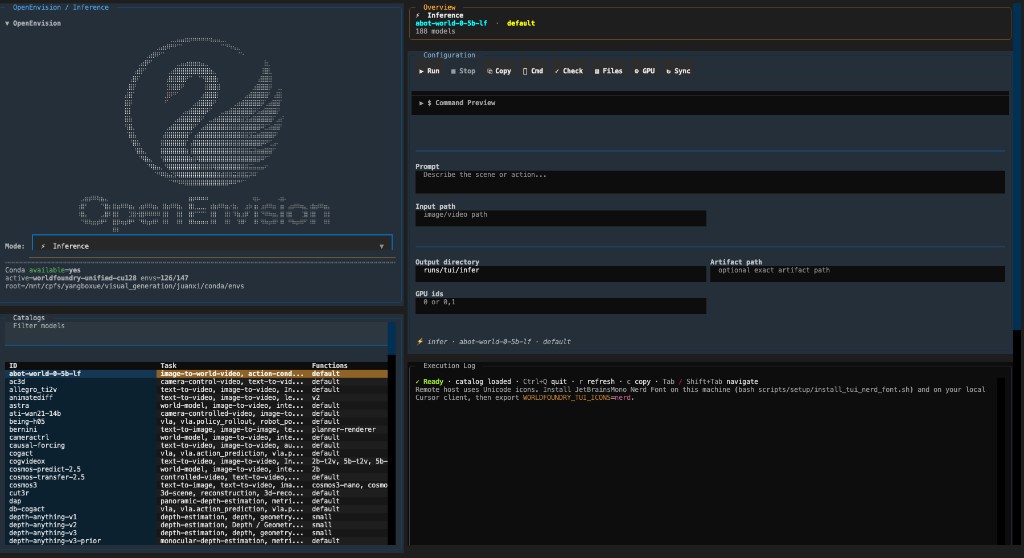
Typical fields include prompt, input path, output directory, optional artifact path, and GPU ids. The Command Preview section updates as you edit parameters.
Studio
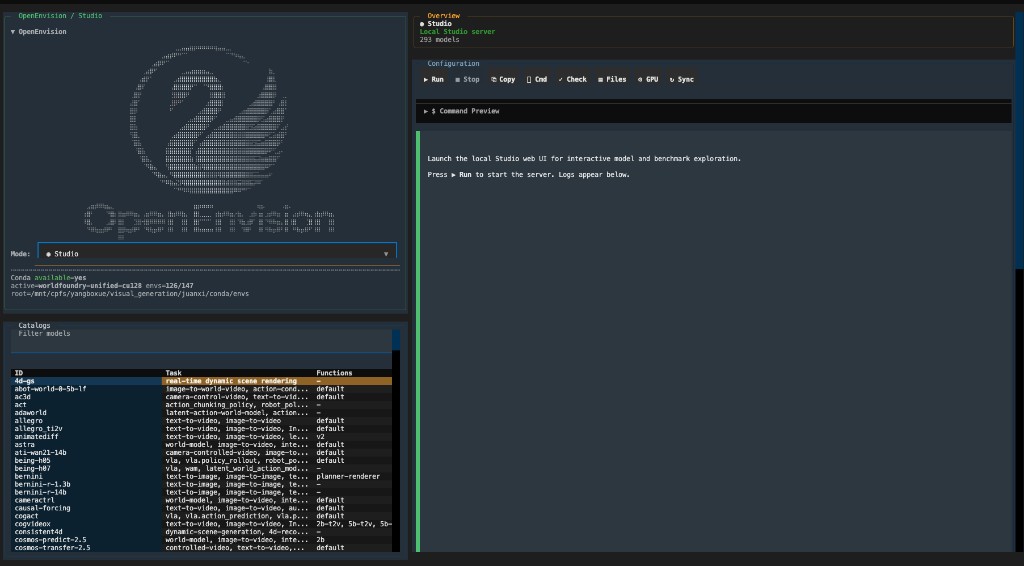
Use Studio to launch the local Studio web UI from the terminal. Press Run to start the server; status and logs appear in the execution log.
Evaluation
Use Evaluation to configure benchmark runs. Choose an evaluation intent, select metrics, and set the output directory. The TUI builds the corresponding worldfoundry-eval command for the selected model × benchmark pair.
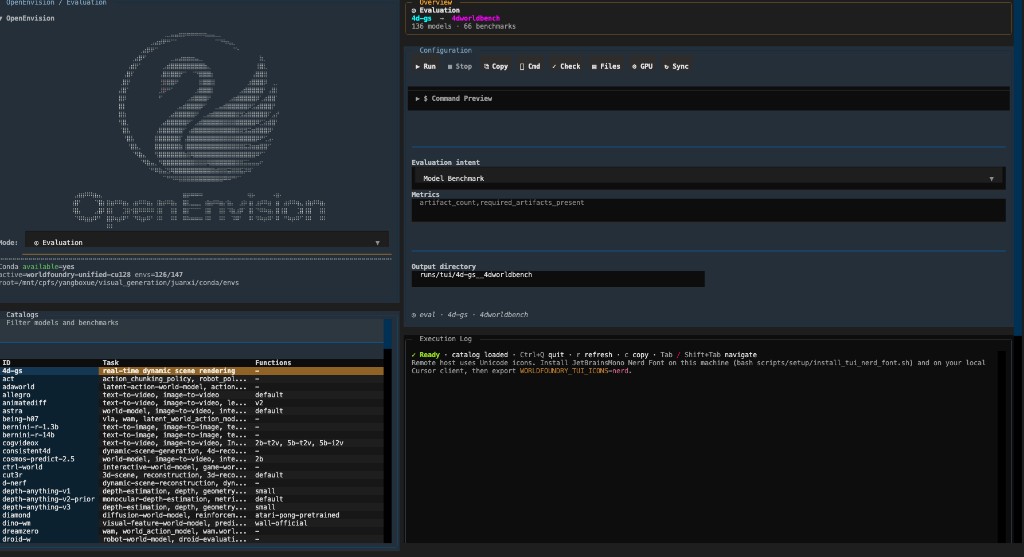
Keyboard shortcuts shown in the log: Ctrl+Q quit, r refresh, c copy, Tab / Shift+Tab navigate.
Configuration
Evaluation mode exposes two focused intents:
- Model Benchmark — Select a model and benchmark; the TUI builds the end-to-end generation plus official benchmark command.
- Score Artifact Directory — Select a benchmark and an existing artifact directory; model selection and metric subsets are hidden because the benchmark's complete protocol is used.
Inference mode presents model-specific parameters such as:
- Steps / iterations — Number of denoising or sampling steps.
- Guidance scale / cfg — Classifier-free guidance strength.
- Sequence length — Maximum token or frame count.
- Seed — Deterministic generation seed (optional).
Changing a parameter in the TUI updates the generated command in real time. Use the Workspace or generate-score CLI when a custom dataset manifest needs more fields than the compact TUI exposes.
Readiness indicators
The TUI surfaces readiness warnings alongside catalog entries:
- Missing checkpoint — The model requires a checkpoint that is not found at the declared path.
- Missing dataset — The benchmark requires a dataset that is not staged locally.
- Missing environment — The runtime profile declares conda packages or CUDA versions that are not satisfied.
- License gate — The model or dataset has a gated or non-commercial license that requires manual review.
When a readiness blocker is present, the generated command includes --mode official-validation by default. This ensures you can validate the wiring without committing GPU resources to a blocked run.
Fallback mode
If the Textual dependency is not installed, the TUI prints a static fallback summary instead of the interactive dashboard. The fallback lists model ids, benchmark ids, and a brief readiness note.
To restore the full interactive TUI, install the [tui] extra:
pip install -e ".[tui]"